
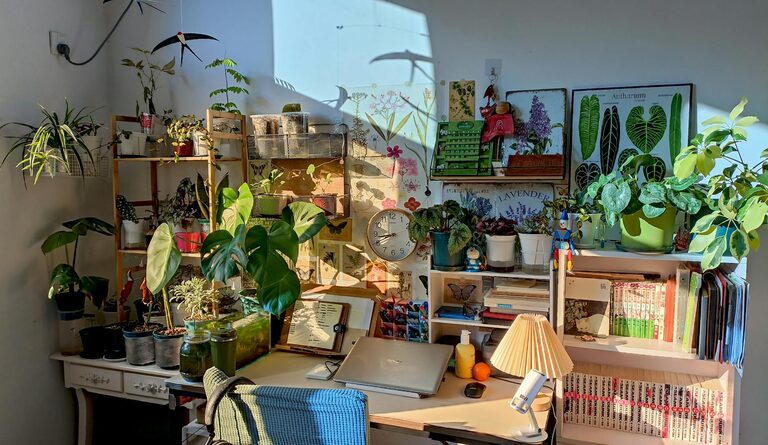
Creating a productive home office space is essential for anyone working remotely or managing tasks from home. A well-designed workspace boosts motivation, reduces distractions, and improves overall efficiency. Whether you have a dedicated room or a small corner, these tips will help you craft an environment that supports your best work.
Choose the Right Location
The first step is selecting the best spot for your home office. Ideally, pick a quiet area away from household traffic and noise. A space with natural light is beneficial, as it improves mood and reduces eye strain. If natural light is limited, plan your lighting carefully to keep the area bright and inviting.
Consider These Factors:
– Proximity to distractions such as TV or kitchen
– Access to power outlets and strong internet connection
– Room for essential furniture and movement
Invest in Ergonomic Furniture
Comfort plays a big role in productivity. Invest in a good-quality chair that supports your back and encourages proper posture. An adjustable desk or a work surface at the right height will reduce strain on your neck and wrists.
Key Furniture Tips:
– Use a chair with lumbar support and adjustable features
– Choose a desk that fits your work style (sitting or standing)
– Keep frequently used items within easy reach to avoid unnecessary stretching
Organize Your Workspace
An organized workspace helps minimize distractions and saves time. Use shelves, drawers, and organizers to store supplies neatly. Declutter regularly and only keep essentials on your desk.
Organization Ideas:
– Desk organizers for stationery and gadgets
– Filing system for important documents
– Cable management solutions to keep cords tidy
Optimize Lighting
Proper lighting is crucial for focus and comfort. Natural daylight is best, so position your desk near a window if possible. For cloudy days or evening work, choose adjustable desk lamps with soft, warm light to prevent eye fatigue.
Lighting Tips:
– Avoid glare on computer screens by adjusting light placement
– Consider task lighting for detailed work
– Balance ambient room light with focused desk light
Personalize Without Overdoing It
Adding personal touches makes the workspace inviting and motivating. However, keep decorations minimal to avoid clutter and distractions. Simple items like a small plant, a calming photo, or inspirational quotes can enhance your mood.
Minimize Distractions
Home environments can be full of distractions. Try these strategies to maintain focus:
– Set clear work hours and communicate them to family
– Use noise-canceling headphones or background music if needed
– Turn off non-essential notifications on devices
Use Technology Wisely
Having the right technology can streamline your tasks and improve communication. Ensure your computer, monitor, and other devices meet your work needs. Regular updates and backups keep your system secure and efficient.
Technology Tips:
– Invest in a high-quality webcam and microphone for video calls
– Use organizational apps for task management
– Keep charging stations handy
Maintain a Routine
Even with the best space, productivity depends on routine. Set a daily schedule that includes breaks, work blocks, and time to stretch. Regular breaks reduce fatigue and maintain concentration throughout the day.
Keep Your Space Fresh and Comfortable
A clean, fresh environment enhances well-being. Open windows to air out the room regularly. Add elements like a small fan or heater to adjust temperature comfortably. Clean your workspace daily to keep it inviting and hygienic.
—
By thoughtfully designing your home office with these tips, you create a space that supports your productivity and well-being. Remember, the best home office is one tailored to your personal needs and work style, so feel free to experiment and adjust as you go.